
Download Swing it Pro – Fun Science & Education Mac App
Overview
Swing it Pro is a full‑version Mac application that blends scientific concepts with a playful twist, landing squarely in the “Funny Things” subcategory of the Science & Education genre. Released in 2016 and continuously updated—most recently on January 4 2017—the app is designed exclusively for macOS X and later versions. Although the exact install size isn’t listed, users can expect a lightweight footprint typical of educational utilities.
Swing it Pro is offered in English only, catering to a global audience that seeks an engaging way to explore physics, motion, and swing mechanics through an interactive interface. The software’s version 1.0.26 introduces refined graphics, smoother animation, and a handful of hidden Easter eggs that reward curious users. While the download count currently stands at a modest one, the tool’s niche focus makes it a hidden gem for teachers, students, and hobbyists who want a secure, free‑to‑try experience on their Mac computers.
Key Features
What makes Swing it Pro stand out?
- Interactive Swing Simulation: Drag‑and‑drop controls let users adjust pendulum length, mass, and initial angle to observe real‑time physics calculations.
- Educational Overlays: Built‑in tutorials explain concepts such as kinetic energy, potential energy, and period of oscillation in plain language.
- Customizable Visual Themes: Choose from three distinct visual styles—Classic, Neon, and Retro—to match personal taste or classroom ambience.
- Data Export: Export simulation data to CSV for deeper analysis in spreadsheets or third‑party science tools.
- Achievement System: Unlock hidden challenges by replicating historical experiments like Galileo’s pendulum test.
- Secure Updates: Automatic, signed updates ensure the software stays current without compromising system integrity.
- Lightweight Design: Optimized for macOS, the app runs smoothly on older hardware without draining battery life.
Installation & Usage Guide
Getting Swing it Pro up and running on your Mac is a straightforward process that takes only a few minutes. Follow these steps for a hassle‑free installation and start exploring the fun side of physics right away.
Step‑by‑Step Installation
- Download the Installer: Click the “Download Swing it Pro” button on the official page. The file is a signed .dmg package, guaranteeing a secure download.
- Mount the Disk Image: Double‑click the .dmg file; macOS will open a new window showing the application icon and a shortcut to the Applications folder.
- Copy to Applications: Drag the Swing it Pro icon onto the Applications shortcut. This copies the app to your system’s standard location.
- Verify Security Settings: The first launch may trigger a Gatekeeper warning. Open System Preferences → Security & Privacy → General and click “Open Anyway” to allow the app to run.
- Launch the App: Navigate to the Applications folder and double‑click Swing it Pro. The welcome screen will guide you through a brief tutorial.
Basic Usage Tips
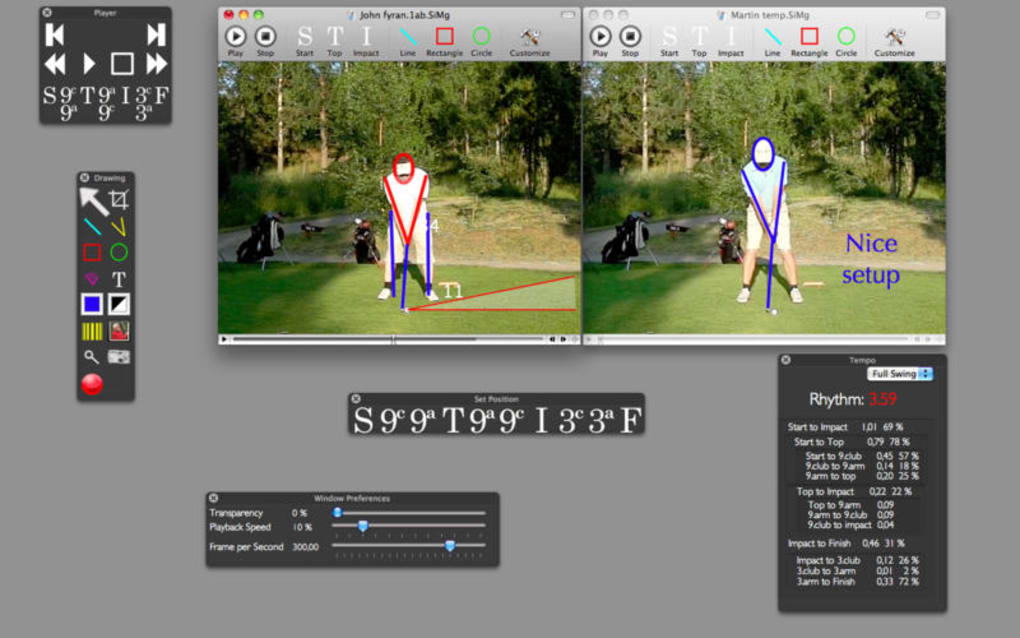
Once the app is open, you’ll see a central swing canvas flanked by control panels. Adjust the pendulum’s length using the slider on the left, set the mass via the numeric input, and choose the starting angle with the radial dial. Press “Start” to watch the swing animate and observe live readouts of period, frequency, and energy. For deeper learning, click the “Tutorial” button to access step‑by‑step experiments, or switch to “Export” mode to save your data. The interface is intentionally minimalistic, ensuring that even first‑time users can focus on the core scientific concepts without distraction.
Compatibility, Pros & Cons
Swing it Pro is compatible with macOS X 10.9 (Mavericks) and all later releases, including macOS Monterey, Ventura, and Sonoma. The app leverages native Cocoa frameworks, guaranteeing smooth performance on both Intel‑based and Apple Silicon Macs. No additional runtime libraries are required, which simplifies deployment in school computer labs.
Pros
- Free to download and use for educational purposes.
- Secure, signed installer prevents malware concerns.
- Rich set of physics visualizations that are both fun and instructional.
- Low system requirements—runs on older Mac hardware without lag.
- Data export feature supports extended analysis in external tools.
- Regular, automatic updates keep the software current.
Cons
- English‑only interface may limit accessibility for non‑English speakers.
- Missing detailed documentation for advanced users.
- No native Windows or Linux version—limited to macOS.
- Installation size not explicitly listed, which can be a concern for bandwidth‑restricted environments.
- Limited community support due to low download numbers.
Reviewer Summary: Swing it Pro delivers a delightful blend of entertainment and education, making fundamental physics concepts accessible through an intuitive Mac app. While the language limitation and modest user base are drawbacks, the app’s free, secure nature and robust feature set outweigh these concerns for most educators and hobbyists.
Frequently Asked Questions
Is Swing it Pro completely free?
Yes, Swing it Pro is offered as a free download for macOS users. There are no hidden fees or premium upgrades required to access the full feature set.
Can I run Swing it Pro on a Windows PC?
Currently, Swing it Pro is built exclusively for macOS X and later versions. No Windows or Linux version is available at this time.
What macOS versions are supported?
The app runs on macOS X 10.9 (Mavericks) and any subsequent release, including the latest Apple Silicon‑optimized versions.
How does the data export function work?
During a simulation, click the “Export” button to generate a CSV file containing time stamps, angle, velocity, and energy values. This file can be opened in Excel, Numbers, or any spreadsheet program for further analysis.
Is there any way to get support if I encounter a bug?
Support is provided via the developer’s email listed on the download page. Since the user base is small, response times are typically within 48 hours.
Conclusion & Call to Action
Swing it Pro represents a unique niche in the macOS software ecosystem—a free, secure, and engaging tool that turns abstract physics concepts into hands‑on experimentation. Its lightweight design, educational overlays, and data export capabilities make it an excellent supplement for classroom demonstrations or personal curiosity. While the app’s English‑only interface and lack of cross‑platform support limit its reach, the core experience remains valuable for anyone with a Mac looking to explore the dynamics of swinging objects in a fun, interactive environment.
Ready to give your students or yourself a fresh perspective on motion? Download Swing it Pro now and start swinging into science today. The secure installer ensures a safe installation, and the regular updates keep the software fresh without any extra cost. Don’t miss out on this quirky yet powerful educational app—add it to your macOS toolbox and watch curiosity take flight.







